Last Updated on July 8, 2026 by Nucleosystech
In the modern competitive corporate environment, scaling an enterprise requires maximum operational efficiency and structured client management. To achieve this, companies constantly invest in high-performance digital infrastructure. However, choosing the right corporate framework often sparks a common debate: CRM vs ERP: Complete Comparison. Organizations frequently find themselves evaluating CRM Software and ERP Software to determine which system will best optimize their daily workflows.
While both platforms serve as the technological backbone for growing companies, they approach business optimization from entirely different angles. One system focuses on accelerating revenue and managing external client relations. Conversely, the other system manages internal back-end resources, financial supply chains, and manufacturing pipelines.
Choosing blindly between these systems can result in redundant expenditures and fragmented data silos. Therefore, understanding the distinct operational scopes, core features, and overlapping functionalities of these systems is crucial. This detailed analysis explores the architectural CRM vs ERP Differences. Additionally, we will discuss how a strategic CRM ERP Integration can transform your enterprise into a highly synchronized, data-driven machine.
Understanding the Core Frameworks: What is CRM and ERP?
To accurately evaluate a CRM vs ERP: Complete Comparison, we must first dissect each system individually. These platforms form the cornerstone of modern corporate architecture. However, they cater to separate operational departments within an organization.
What is CRM Software?
CRM stands for Customer Relationship Management. This specialized system is engineered to manage every stage of a customer’s lifecycle. The primary goal of a CRM is to streamline customer acquisition, boost retention, and accelerate direct sales revenue. It functions as a central repository for all front-office activities. This allows your sales, marketing, and customer support departments to access real-time client histories instantly.
By leveraging automated customer tracking, companies can eliminate manual documentation. This allows teams to focus entirely on closing deals. For organizations seeking custom applications tailored to unique sales funnels, exploring specialized CRM Software Development provides customized dashboards that align perfectly with specific growth metrics.
What is ERP Software?
ERP stands for Enterprise Resource Planning. While a CRM focuses entirely on the front-office client experience, ERP systems focus heavily on back-office operational mechanics. This architecture is built to manage, automate, and integrate core internal business processes across multiple departments. These departments include finance, human resources, procurement, inventory tracking, and distribution.
An ERP platform establishes a single, unified database for the entire company. This setup ensures that your accounting team, supply chain managers, and warehouse supervisors all operate using the exact same data. For specialized industrial operations, implementing a robust Manufacturing Custom ERP system is vital to synchronize raw material procurement with floor production schedules.
CRM vs ERP Differences: The Ultimate Breakdown
Understanding the fundamental distinctions between these systems requires a deep dive into their daily operational objectives. Below is a detailed comparison of how these tools manage data, workflows, and operational scaling.
| Comparative Parameter | CRM Software | ERP Software |
| Primary Operational Focus | Front-Office Operations (Sales, Marketing, Customer Support) | Back-Office Operations (Finance, Supply Chain, HR, Logistics) |
| Core Objective | Driving revenue growth, maximizing sales, and increasing customer retention | Lowering operational costs, enhancing process efficiency, and ensuring financial accuracy |
| Primary Target Users | Sales Reps, Marketing Executives, Customer Success Agents | Accountants, Inventory Managers, HR Professionals, Operations Leads |
| Data Management Scope | Customer interaction history, lead pipelines, support tickets, marketing campaigns | General ledgers, payroll records, manufacturing schedules, supply chains |
| Financial Tracking | Sales pipelines, individual deal values, customer lifetime value (LTV) | Profit margins, corporate balance sheets, operational overhead, billing |
Core Features of Modern CRM Software
A comprehensive CRM vs ERP: Complete Comparison requires a close look at the specific features that drive front-office growth. A modern CRM system is far more than just a digital address book. It serves as a comprehensive engine for sales and marketing automation.
1. Advanced Sales Automation
Managing pipelines manually can lead to missed follow-ups and lost revenue. Modern CRMs utilize Sales Automation to instantly route inbound leads to the appropriate sales representatives. They automatically trigger personalized email drip campaigns and send real-time reminders for follow-up calls. This ensures no high-value opportunity slips through the cracks.
2. Comprehensive Contact and Lead Management
A CRM records every digital interaction a prospect has with your brand. From the initial website form submission to email clicks and support conversations, your sales team gains full visibility into the prospect’s journey. This deep context allows for highly personalized sales pitches that significantly boost conversion rates.
3. Automated Customer Support Pipelines
Retaining existing clients is often more cost-effective than acquiring new ones. CRM platforms include built-in ticketing frameworks that organize, prioritize, and track customer issues. This ensures that support agents can resolve customer inquiries quickly and accurately.
Core Features of Enterprise ERP Systems
On the other side of our CRM vs ERP: Complete Comparison are the robust, back-office optimization capabilities found within modern enterprise ERP systems. These tools focus on resource maximization and cross-departmental alignment.
1. Unified Financial and Accounting Control
The foundational module of any ERP system is its centralized accounting ledger. It automates complex corporate financial management processes, such as tracking accounts payable and receivable, managing payroll, and generating real-time balance sheets. This eliminates manual data entry errors and ensures strict compliance with tax regulations.
2. Comprehensive Supply Chain and Inventory Tracking
For businesses that handle physical inventory, an ERP provides real-time visibility into stock levels across multiple warehouses. It tracks items from raw material procurement to final customer delivery. This comprehensive tracking helps prevent costly stockouts and minimizes excessive warehouse storage fees.
3. Integrated Workflow Automation
An enterprise cannot scale efficiently when departments operate in silos. ERP frameworks introduce comprehensive Workflow Automation across the entire organization. For example, when a sales order is officially placed, the ERP can automatically update inventory logs, generate a warehouse packing slip, and create a financial invoice without requiring human intervention.
ERP for Manufacturing: Driving Industrial Efficiency
While service-oriented businesses often rely on lightweight accounting tools, an ERP for Manufacturing is absolutely essential for industrial, production-heavy organizations. Manufacturing workflows involve complex variables, including fluctuating raw material costs, equipment upkeep schedules, and intricate labor management.
An industrial-grade ERP system unifies these variables into a single dashboard. It offers specific, high-value advantages:
- Bill of Materials (BOM) Management: Tracks the precise components and recipes required to create finished products.
- Master Production Scheduling (MPS): Align production schedules with real-time customer demand to avoid manufacturing bottlenecks.
- Shop Floor Control: Gain real-time visibility into machine output, labor efficiency, and overall equipment effectiveness (OEE).
By utilizing specialized ERP Automation Systems, manufacturers can accurately forecast raw material shortages. This allows them to automate purchase orders and maintain lean, high-margin production operations.
When Does a Business Need CRM Software vs ERP Software?
Determining which platform your business requires depends entirely on your current operational bottlenecks. Organizations often need to step back and evaluate their internal workflows to decide where to focus their technological investments.
Signs Your Business Urgently Needs a CRM:
- Leads are slipping through the cracks: Your marketing team generates inquiries, but sales reps fail to follow up consistently.
- Fragmented customer histories: Account managers struggle to find historical emails or previous support tickets when speaking with a client.
- Inaccurate sales forecasting: Leadership cannot accurately predict next quarter’s revenue because deal pipelines are tracked across scattered spreadsheets.
Signs Your Business Urgently Needs an ERP:
- Inaccurate inventory data: Sales teams confirm product availability, only to discover the warehouse is completely out of stock.
- Delayed financial reporting: Closing monthly financial books requires hours of manual cross-referencing between disconnected systems.
- Operational inefficiencies: Departments waste significant time manually emailing data back and forth to complete basic business processes.
The Power of CRM ERP Integration
Choosing between these two systems does not have to be an all-or-nothing decision. In fact, relying on isolated platforms can lead to significant data silos. A sales team using a standalone CRM might close a major deal, but if that system is disconnected from the ERP, the manufacturing or fulfillment teams remain completely unaware of the new order.
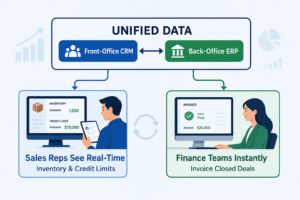
To eliminate this friction, forward-thinking enterprises deploy a unified CRM ERP Integration. Connecting these systems bridges the gap between front-office customer data and back-office supply chain logistics.
Key Operational Benefits of a Unified Integration:
- 360-Degree Operational Visibility: Sales representatives can view real-time warehouse inventory levels and credit limits directly within their CRM dashboard before closing a contract.
- Elimination of Duplicate Data Entry: Customer contact details and order data sync automatically between both platforms. This completely removes the risk of manual data entry errors.
- Accelerated Order Fulfillment: The moment a deal is marked as “Closed-Won” in your CRM, the ERP immediately generates a fulfillment order and financial invoice. This drastically reduces your overall delivery cycle.
Selecting the Right Business Software Solutions for Scale
Every company’s path to growth is unique. Because of this, off-the-shelf software packages often fail to accommodate specialized operational workflows. To build a true competitive advantage, enterprises must carefully invest in tailored Business Software Solutions that can flex and evolve alongside their operations.
When assessing vendor frameworks, consider the following strategic evaluation criteria:
- Total Architecture Customization: Can the software be modified to fit your exact business workflows, or are you forced to alter your operations to match the software’s rigid limitations?
- Cloud Scalability: As your transaction volumes and user counts expand, can the digital infrastructure scale seamlessly without causing performance drops?
- Comprehensive API Ecosystems: Does the platform offer open, secure APIs that simplify future integrations with third-party tools?
At Nucleosys Tech, we specialize in developing future-ready software systems that remove operational friction. Whether you need a highly specialized custom CRM or an enterprise-grade ERP system built for complex manufacturing, our team has over 13 years of proven experience delivering scalable applications.
Transforming Your Enterprise Infrastructure with Nucleosys Tech
Are you ready to eliminate operational data silos and build a highly scalable, automated business infrastructure? Navigating the complexities of system selection and integration requires a trusted, experienced technology partner.
Nucleosys Tech provides end-to-end consulting, custom software development, and seamless system integrations tailored to your exact business objectives. We don’t believe in generic, one-size-fits-all software. Instead, our expert developers build bespoke digital solutions that optimize your internal processes and drive sustainable front-office growth.
Stop letting fragmented applications hold your business back. Contact our enterprise solutions experts at Nucleosys Tech today to schedule your comprehensive, free growth consultation. Let us design the ultimate digital foundation to scale your enterprise operations efficiently.
Frequently Asked Questions (Q&A)
1. Can a single software system handle both CRM and ERP functions?
Yes, several major enterprise software suites offer combined modules within a single ecosystem. Additionally, many growing businesses choose to develop custom, integrated systems tailored to their exact workflows. This approach ensures seamless data flow between front-office sales and back-office accounting without the bloat of unnecessary features.
2. Is it better for a startup to implement a CRM or an ERP first?
For most early-stage startups, implementing a CRM is typically the first priority. In the early phases of a business, driving revenue, acquiring customers, and validating product-market fit are paramount. As customer volume grows and internal processes like inventory, payroll, and complex accounting become difficult to manage manually, introducing an ERP becomes critical.
3. How does a CRM ERP integration improve cash flow management?
Integrating both platforms accelerates your overall order-to-cash cycle. The moment a sales representative closes a deal within the CRM, the integrated ERP instantly generates an accurate invoice and updates accounting logs. This eliminates administrative delays, speeds up billing, and reduces payment collection times.
4. What is the typical timeline for implementing an enterprise ERP system?
Implementation timelines vary based on the overall complexity of your business and the level of customization required. A standard implementation can take anywhere from a few months to over a year. Working with an experienced software development partner like Nucleosys Tech helps streamline this process through a structured, phased implementation strategy that minimizes disruption to your daily operations. For more insights on selecting technology platforms, check out Gartner’s enterprise software research guides or explore CIO’s digital transformation insights to learn more about industry standards.