
Why Website Security Matters: The Ultimate Guide to Protecting Your Digital Asset in 2026

In the current digital landscape, your website is often the first point of contact between your business and your customers. As a business owner, you might focus on aesthetics and user experience, but there is one question that should be at the forefront of your strategy: Why Website Security Matters? With the rapid evolution of technology, cyber threats have become more sophisticated, making robust security not just an option, but a fundamental necessity for survival. At Nucleosys Tech, we believe that a secure website is the foundation of a successful online presence. Whether you are running a small blog or a complex enterprise platform, understanding the gravity of protection is the first step toward long-term growth. Understanding Why Website Security Matters for Modern Businesses When we discuss website security, we aren’t just talking about a single plugin or a strong password. It is a comprehensive ecosystem of protocols designed to protect your site from unauthorized access, data theft, and malicious attacks. 1. Protecting Sensitive User Data The most critical reason why website security matters is the protection of user data. From email addresses and phone numbers to sensitive credit card information, your website likely handles a significant amount of private data. A single data breach can lead to catastrophic consequences, including identity theft for your users and massive legal liabilities for your company. 2. Safeguarding Brand Reputation and Trust Trust is the currency of the internet. If a visitor sees a “Not Secure” warning in their browser or, worse, experiences a security incident on your site, that trust is instantly shattered. Rebuilding a reputation after a hack is significantly more expensive and time-consuming than investing in website maintenance services from the start. 3. Boosting SEO and Google Search Rankings Security is a confirmed ranking factor for search engines. Google prioritizes sites that use the HTTPS protocol secured by SSL certificates. If your site is compromised, Google may even blacklist it, removing it from search results entirely to protect users. Therefore, if you want to rank higher, you must treat security as a core component of your SEO strategy. Common Cyber Threats and How to Mitigate Them To truly appreciate why website security matters, one must understand the threats lurking in the digital shadows. The Rise of Automated Malware and SQL Injections Hackers often use automated bots to scan the web for vulnerabilities. SQL injection remains one of the most common methods used to attack database-driven websites, allowing attackers to view or delete data they are not authorized to access. Phishing and Cross-Site Scripting (XSS) These attacks target the users of your site rather than the server itself. By injecting malicious scripts into your pages, attackers can steal session cookies or redirect users to fraudulent websites. Robust malware protection and regular security audits are the only ways to stay ahead of these evolving tactics. The Technical Pillars of a Secure Website Ensuring your site is safe requires a multi-layered approach. Here are the essential components every business should implement: SSL Certificates & HTTPS: This encrypts the data transmitted between your server and the user’s browser. Regular Software Updates: Outdated CMS versions or plugins are the primary entry points for hackers. Web Application Firewalls (WAF): These act as a filter between your website and the internet, blocking malicious traffic before it reaches your server. Secure Coding Practices: At Nucleosys Tech, our development team follows strict security-first protocols to ensure every line of code is resilient against attacks. Why Website Security Matters for E-commerce Platforms For online stores, the stakes are even higher. E-commerce security is not just about protecting your site; it’s about protecting your livelihood. According to recent cybersecurity statistics from Palo Alto Networks, the speed of data exfiltration has increased significantly, meaning breaches happen faster than ever. If your e-commerce site is compromised, you risk losing not only sales but also the ability to process payments if you are found non-compliant with PCI-DSS standards. Investing in e-commerce website development with built-in security features is the smartest move for any growing retailer. The Financial Impact of Ignoring Security Many small businesses believe they are “too small” to be targeted. However, small businesses are often the preferred targets because they typically have weaker defenses. The cost of a breach includes: Legal fees and regulatory fines (especially under GDPR). The cost of forensic investigation and site recovery. Loss of revenue during downtime. Increased customer acquisition costs due to lost trust. According to research by the University of San Diego, the global cost of cybercrime is projected to reach trillions of dollars by 2028. This highlights exactly why website security matters for businesses of all sizes. How Nucleosys Tech Secures Your Digital Future Building a secure website is a complex task that requires expert knowledge. At Nucleosys Tech, we offer specialized Website Maintenance Services designed to keep your site updated, backed up, and shielded from the latest threats. Our team doesn’t just build websites; we build digital fortresses. From implementing advanced firewall configurations to performing routine vulnerability scans, we ensure that your focus remains on growing your business while we handle the technical safety. Partner with the Experts Don’t wait for a security breach to happen before taking action. Protecting your digital presence is an investment in your brand’s future. Get a Free Security Audit Today – Contact Nucleosys Tech! Frequently Asked Questions (Q&A) Q1: How often should I update my website security? Website security is an ongoing process. You should perform software and plugin updates weekly, while comprehensive security audits should be conducted at least quarterly or after any major site changes. Q2: Does an SSL certificate protect me from all hacks? No. An SSL certificate only encrypts data in transit. While it is essential for user data privacy, it does not protect your site from malware, DDoS attacks, or server-side vulnerabilities. Q3: Can a hacked website affect my SEO rankings? Absolutely. Google and other search engines prioritize safe browsing. If your site is flagged for malware, your rankings will drop significantly,
The Ultimate Website Speed Optimization Guide: Accelerate Your Digital Growth in 2026

In an era where digital patience is measured in milliseconds, the performance of your online presence is no longer a luxury—it is a survival requirement. This comprehensive Website Speed Optimization Guide is designed to help you navigate the complexities of modern web performance. Whether you are running a complex e-commerce engine or a sleek corporate portfolio, the speed at which your pages load directly dictates your search engine rankings, user retention, and, ultimately, your bottom line. Why Website Speed Optimization Matters for SEO Search engines like Google have explicitly stated that page experience is a primary ranking factor. When a user clicks a link and faces a delay, the likelihood of a “bounce” increases by over 32% as load time goes from one to three seconds. By following a structured Website Speed Optimization Guide, you aren’t just pleasing bots; you are crafting a seamless journey for your customers. 1.Understanding Core Web Vitals and User Experience To begin any Website Speed Optimization Guide, we must look at the metrics that Google prioritizes. Core Web Vitals—comprised of LCP (Largest Contentful Paint), FID (First Input Delay), and CLS (Cumulative Layout Shift)—measure how real users experience your site. LCP: Measures loading performance. Aim for 2.5 seconds or faster. FID: Measures interactivity. Aim for less than 100 milliseconds. CLS: Measures visual stability. Aim for a score of less than 0.1. High-performance sites often utilize advanced frameworks. For businesses looking for robust builds, exploring BigCommerce developers can provide a foundation where speed is integrated into the architecture from day one. 2. Image Compression and Next-Gen Formats Images often account for the bulk of a webpage’s weight. A key pillar of this Website Speed Optimization Guide is the transition to next-gen formats like WebP or AVIF. Lossless Compression: Reduces file size without sacrificing quality. Lazy Loading: Ensures images only load when they enter the user’s viewport. Responsive Images: Serving different sizes based on the user’s device (Mobile vs. Desktop). 3. Minimizing HTTP Requests and Script Bloat Every time a browser fetches a file (CSS, JS, or images), it creates an HTTP request. Too many requests result in a “bottleneck.” Combine Files: Merge multiple CSS files into one. Minification: Remove unnecessary characters (spaces, comments) from your code. Asynchronous Loading: Allow scripts to load in the background so they don’t block the visual rendering of the page. For those managing high-traffic platforms, ensuring your backend is optimized is vital. You might consider how PHP development services can streamline server-side processing to reduce Initial Server Response times. 4. Leveraging Browser Caching and CDNs A Website Speed Optimization Guide wouldn’t be complete without mentioning the power of the edge. Browser Caching: Instructs the visitor’s browser to store parts of your site locally, so they don’t have to re-download everything on their second visit. Content Delivery Networks (CDN): Distribute your content across a global network of servers. Using a service like Cloudflare ensures that a user in London accesses data from a London server, not one in New York. 5. Mobile-First Speed Performance With over 50% of global traffic coming from mobile devices, your Website Speed Optimization Guide must prioritize the mobile experience. Mobile networks (4G/5G) are less stable than fiber-optic home internet. Prioritize Above-the-Fold Content: Load the top of the page first. Reduce JavaScript Execution Time: Heavy scripts can cause mobile processors to lag, leading to a poor user experience. 6. Database Optimization for E-commerce For dynamic sites, the database is often the culprit behind slow speeds. Clean Up Overheads: Remove old plugin data and post revisions. Indexing: Ensure your database tables are properly indexed for faster retrieval. If you are scaling an online store, professional e-commerce development can help optimize these background processes to ensure lightning-fast checkouts. Transform Your Digital Performance Today Reading a Website Speed Optimization Guide is the first step, but implementation requires technical precision. At Nucleosys Tech, we specialize in turning sluggish websites into high-conversion engines. Our team of experts handles everything from code minification to server-side architecture, ensuring your business stays ahead of the competition and the search engine algorithms. Contact Nucleosys Tech for a Performance Audit. Frequently Asked Questions (Q&A) Q: How does website speed affect my SEO ranking? Google uses speed as a ranking signal. A faster site improves user experience metrics, which leads to higher rankings and more organic traffic. Q: What is a good page load time? Ideally, your site should load in under 2 seconds. Anything slower than 3 seconds sees a significant increase in bounce rates. Q: Can I optimize my site speed without coding knowledge? While plugins can help with basic tasks like image compression, deep optimization (like fixing render-blocking JS) usually requires professional development. Q: Is mobile speed different from desktop speed? Yes. Google uses mobile-first indexing, meaning your mobile speed is often more important for your overall SEO than your desktop speed.
5 Signs Your BIM Firm Has Outgrown Excel (And What to Use Instead)
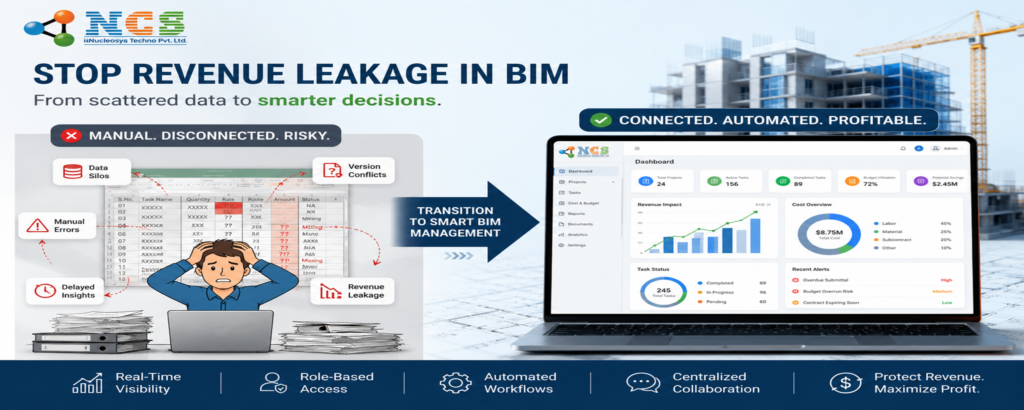
In the early days of a Building Information Modeling (BIM) firm, Microsoft Excel is the ultimate ally. It’s flexible, free, and everyone knows how to use it. You start by tracking a few architectural drafts and simple client timelines. But as your firm scales, that once-reliable spreadsheet starts to feel like a house of cards. One broken formula or a forgotten manual update, and your entire project timeline collapses. If you are still relying on manual spreadsheets for complex modeling workflows, you likely need a dedicated BIM project management software to maintain your competitive edge. The transition from a startup to a mid-sized firm requires more than just better architects; it requires a digital infrastructure that can handle the weight of real-time data. 1. The Chaos of Manual Entry and Version Control The most immediate sign that you’ve outgrown Excel is the “Version Final_v2_Updated” syndrome. When multiple Project Managers, Team Leads, and Employees are all trying to update the same tracker, data integrity vanishes. In a fast-paced BIM environment, manual entry is the enemy of accuracy. A single typo in a cell can lead to misallocated resources or missed deadlines. Unlike a professional MIS (Management Information System), Excel lacks role-based access control. In a dedicated system like the one developed by Nucleosys Tech, an Admin or Director can see the high-level bird’s eye view, while an Employee only sees their specific tasks. This eliminates the clutter and prevents accidental deletions that haunt spreadsheet-based firms. 2. Why Excel Can’t Track “Real-Time Profitability” Can you tell, at this exact moment, if your current project is under budget? If you are using Excel, the answer is likely “I’ll know after the weekly manual update.” Excel is a static tool. It doesn’t “know” when an employee has spent ten extra hours on a complex Revit model unless someone manually types it in. To truly scale, you need a system that integrates timesheet management with project milestones. High-growth firms use BIM execution planning tools to ensure technical standards, but they often forget the financial side. Without real-time tracking, you only realize a project was unprofitable after it’s already finished. 3. The “Information Silo” Between Teams and Clients As your BIM firm grows, the gap between what the team is doing and what the client sees often widens. In Excel, feedback is usually buried in long email chains. A robust BIM project management software solves this by centralizing client management. Imagine a portal where a client can provide direct feedback on a milestone, and that feedback is immediately visible to the Project Manager. When information related to clients, projects, and tasks is stored in separate spreadsheets, things fall through the cracks. A unified MIS ensures that every stakeholder, from the Director to the Client, is looking at a single source of truth. 4. Lack of Automated Reporting and Error Tracking How long does it take your team to generate a “Load Factor Report” or an “External Error Report”? If it takes hours of copying and pasting from different sheets, you have outgrown your tools. For a BIM firm, quality control is everything. You need to track internal error reports and performance reports to ensure your models meet international standards. Modern systems allow you to generate these reports with a single click. Whether it’s a milestone report for a stakeholder or an efficiency report to see which team members are over-leveraged, automation is the only way to scale without adding massive administrative overhead. 5. Inefficient Task Allocation and Time Management In Excel, assigning a task usually involves sending an email or a message. There is no built-in timer for time management or a structured way to approve tasks. When a Team Lead or Project Manager can assign a task directly within a system—complete with a running timer—accountability skyrockets. This level of granularity is essential for BIM projects where “resource-based” and “project-based” planning happen simultaneously. You need to know exactly how many hours were spent on a “Service Master” versus a “Document Management System.” Introduction to India’s First Dedicated MIS for BIM: Nucleosys Tech If these signs sound familiar, it’s time to move beyond the grid. Nucleosys Tech has developed a specialized Management Information System (MIS) designed specifically for the rigorous demands of technical firms. Our MIS is not a generic tool; it is a comprehensive ecosystem that handles: Role-Based Access: Tailored views for Admin, Director, Project Manager, Team Lead, and Employees. End-to-End Management: Seamlessly manage clients, projects (Resource or Project-based), and complex timesheets. Advanced Task Module: PMs can assign tasks to themselves or others, with built-in approval workflows. Real-Time Analytics: Access Milestone reports, Feedback modules, and Error tracking instantly. By switching from fragmented spreadsheets to a unified MIS, you empower your team to focus on BIM excellence rather than data entry. Boost Your Firm’s Efficiency with Professional Solutions Stop fighting with spreadsheets and start scaling your BIM operations with precision. At Nucleosys Tech, we specialize in creating custom software solutions that bridge the gap between technical expertise and operational efficiency. Whether you need a robust MIS or a custom content strategy for your digital presence, we are here to help. Contact Nucleosys Tech Today for a Free MIS Demo. Q&A: Navigating the Shift from Excel to MIS Q1: Is it hard to migrate data from Excel to a new MIS? Most professional systems, including our MIS, allow for bulk data imports via CSV or Excel, making the transition much smoother than manual entry. Q2: How does an MIS improve BIM model quality? By using the Internal Error Report and Feedback modules, PMs can track recurring issues in models and implement training or process changes to fix them. Q3: Can I manage both freelance resources and full-time staff? Yes. Our system supports both resource-based and project-based options, allowing you to track time and tasks for your entire workforce in one place. Q4: What is the benefit of role-based access? It ensures data security and reduces “dashboard fatigue.” Employees only see what they need to work on,
Remote BIM Team Tracking: Attendance vs. Performance
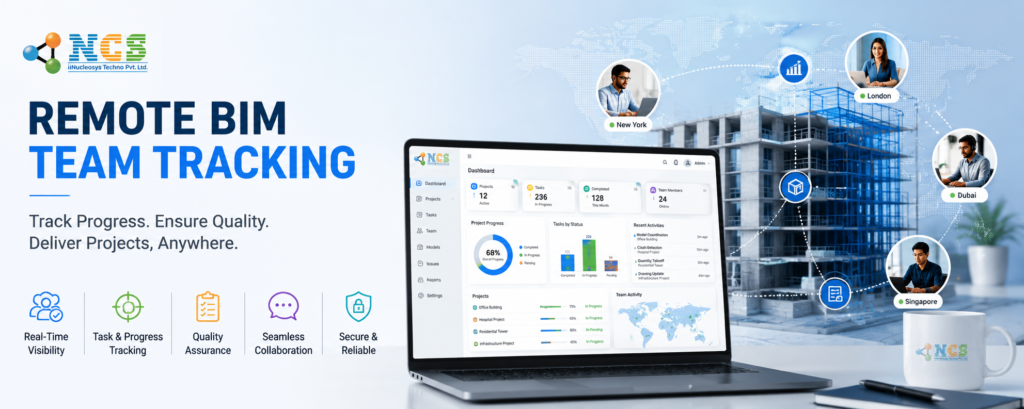
In the modern AEC landscape, the transition to remote work has been both a blessing and a source of silent anxiety for firm owners. You see the “Active” green status on Microsoft Teams. You see the 8-hour logs on the weekly spreadsheet. But as a manager, a nagging question remains at the back of your mind: Are they actually modeling, or are they just moving the mouse? This is the “Ghost Employee” fear. In a high-precision field like Building Information Modeling (BIM), presence does not equal productivity. When a remote team member underperforms, the ripple effect doesn’t just hit one project—it creates a bottleneck that threatens your entire delivery schedule and firm reputation. To scale a successful remote BIM operation, you must move past simple attendance and master the art of Remote BIM Team Tracking. 1. The 8-Hour Fallacy: Why Logging Time Isn’t Enough The most common mistake in employee management is equating a full timesheet with a productive day. In BIM coordination, a technician might spend three hours fighting a software crash and another two hours on uncoordinated “quick fixes” that weren’t in the scope. If your tracking system only asks for a total number at the end of the day, you are missing the context of labor. Attendance tells you they were “at work.” Performance tells you they delivered an LOD 400 model on schedule. Without a granular Management Information System (MIS), you are managing by “gut feeling” rather than data. 2. Understanding Load Factor & Utilization in BIM To truly understand if your team is working, you need to look at two critical KPIs: Utilization Rate and Load Factor. What is Utilization? Utilization is the percentage of an employee’s total logged time spent on billable project tasks versus non-billable administrative work. In a healthy BIM firm, your “production” staff should ideally maintain a utilization rate of 75-85%. What is Load Factor? Load factor measures the amount of work assigned to a person relative to their capacity. Underloaded: Leads to “time-filling” behavior and boredom. Overloaded: Leads to burnout and high error rates. Using the MIS by Nucleosys Tech, directors can pull real-time reports to see who is carrying the heaviest load and who has the “white space” to take on the next big Revit project. 3. Spotting the Difference: Burnout vs. Laziness Data-driven management isn’t just about catching “slackers”; it’s about protecting your best assets from burning out. The Indicator Burnout Signs Underperformance (Laziness) Signs Task Completion Sudden drop in quality from a previously high performer. Consistently missing deadlines or “forgetting” tasks. Error Reports High frequency of “silly” mistakes in model coordination. Tasks are marked “complete” but remain unstarted in the model. Timer Usage Long, erratic hours logged late at night. Short, inconsistent bursts of activity with long gaps. By utilizing the error report and milestone tracking features in our MIS, managers can intervene with support for a burned-out star or coaching for a struggling junior before the project fails. 4. Solving the Remote Gap with Nucleosys Tech’s MIS At Nucleosys Tech, we designed our MIS specifically to bridge the visibility gap between managers and remote teams. Here is how we turn “Ghost Employees” into high-performing assets: Role-Based Access: Strategic Visibility Our system operates on a sophisticated hierarchy: Admin, Director, Project Manager, Team Lead, and Employee. Admins/Directors see the “Big Picture” of company-wide productivity. Project Managers can assign tasks and monitor progress across multiple clients. Employees have a focused dashboard showing exactly what they need to work on. Real-Time Task & Timer Management Gone are the days of manual, “estimated” timesheets. Our system features an integrated timer for time management. The employee selects an assigned task (e.g., “Clash Detection – Area A”). They start the timer. The system logs exactly how long that specific BIM task took. This level of detail allows you to compare performance across the team. If one coordinator takes 2 hours for a task that takes everyone else 5, you’ve found a high-performer or a potential “corner-cutter.” Integrated Client & Project Hub Whether you bill based on a Resource-Based model (hourly) or Project-Based (fixed-fee), the MIS tracks everything. You can store all client information and link it directly to specific project milestones, ensuring that your remote team’s efforts are always aligned with the contractual scope. 6. Transparency via the Feedback Module One of the biggest hurdles in remote work is the lack of a “closed-loop” communication. Our Feedback Module allows clients to review milestones and provide direct input. This data is fed back into the MIS, allowing managers to see if an employee’s “8 hours” resulted in a satisfied client or a list of revisions. Conclusion: Data is the Cure for Uncertainty Remote work doesn’t have to be a guessing game. When you replace “checking in” with “checking the data,” you build a culture of trust and high performance. The MIS by Nucleosys Tech provides the clarity you need to stop worrying about attendance and start celebrating performance. Ready to transform your remote BIM management? Don’t let inefficiency drain your profits. Empower your managers with the tools they need to lead effectively in a digital-first world. Book a Demo with Nucleosys Tech today and see how our Management Information System can streamline your team tracking and project delivery. Frequently Asked Questions (FAQs) 1.Is “Remote BIM Team Tracking” considered micromanagement? Not when it’s focused on outcomes. Our MIS is designed to provide accountability, not surveillance. By tracking tasks and timers, you are giving employees a clear structure and ensuring they get credit for every hour they actually work. 2.Can the system handle complex BIM projects with multiple stakeholders? Yes. With role-based access, you can involve Team Leads and Project Managers in the oversight process. The system manages Client Management and Project Management (both project-based and resource-based) in one centralized hub. 3.How does the “Timer” feature improve billing accuracy? Manual timesheets are often filled out at the end of the week based on memory, leading to “rounded down” hours and lost revenue. Our integrated timer
Revenue Leakage in BIM: Stop Working for Free | Nucleosys Tech
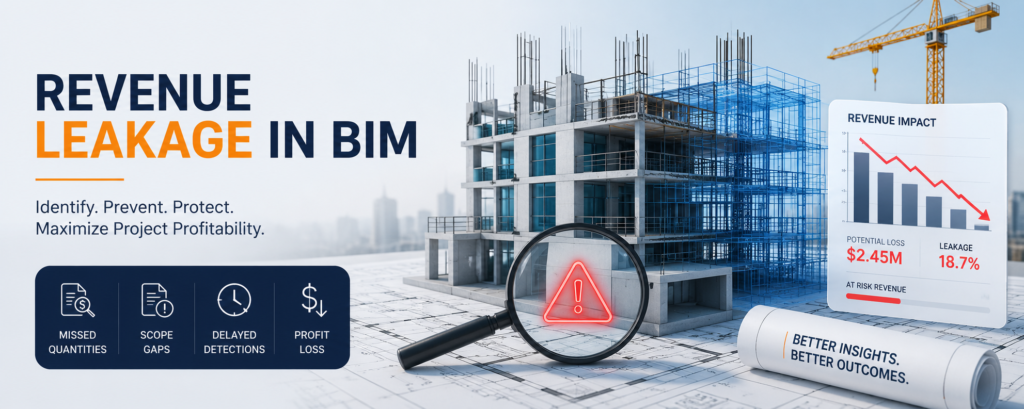
Revenue Leakage in BIM: Why You Are Working for Free (And How to Stop It) The Building Information Modeling (BIM) industry is built on precision. We measure tolerances in millimeters and coordinate complex systems across massive datasets. Yet, when it comes to the financial health of these projects, many firms operate with a “leaky bucket” mentality. Revenue leakage—the unnoticed loss of earned revenue—is the silent killer of BIM consultancy and AEC firms. You might be hitting your project milestones, but if your billable hours aren’t aligning with your bank account, you are effectively working for free. In this deep dive, we’ll explore why BIM projects lose money and how a robust Management Information System (MIS) can plug the holes. What is Revenue Leakage in BIM? Revenue leakage occurs when services are provided but not billed, or when inefficiencies eat into the profit margins of a fixed-fee or resource-based contract. In the world of BIM, this often looks like: Unrecorded “quick fixes” in a Revit model. Excessive coordination meetings that weren’t in the original scope. Manual data entry errors in project tracking. According to industry benchmarks from Harvard Business Review, companies can lose up to 5% to 10% of their annual revenue to leakage. In a high-stakes field like BIM, where margins are already tight, that 10% is often the difference between scaling your business and barely staying afloat. 1. The “Invisible” Thieves: Common Causes of BIM Revenue Leakage Scope Creep without Change Orders In BIM, the line between “standard design development” and “extraordinarily complex modeling” is thin. If your Project Manager (PM) agrees to add a higher Level of Development (LOD) without a formal change order, you are donating your team’s expertise for free. The “Five-Minute” Task Trap BIM Technicians often perform small tasks—re-exporting an IFC file, fixing a minor clash, or updating a sheet—that take “just five minutes.” When these aren’t tracked via a timer for time management, they vanish from the billing cycle. Multiply this by a team of 20, and you’re losing dozens of billable hours every week. Resource Misallocation Using a Senior BIM Coordinator for basic data entry is a form of internal leakage. You are paying a high salary for low-value output. Without role-based access and clear task visibility, it’s impossible to see where your expensive talent is being wasted. 2. Plugging the Holes with MIS (Management Information System) To stop the bleed, you need more than just spreadsheets. You need a centralized nervous system for your firm. This is where MIS by Nucleosys Tech transforms your workflow. Role-Based Access: Accountability at Every Level One of the primary causes of leakage is a lack of oversight. Our MIS platform features sophisticated role-based access, ensuring that: Admins & Directors: Have a bird’s-eye view of client profitability and firm-wide reports. Project Managers: Can assign tasks and monitor “Project vs. Resource” based allocations. Team Leads: Can approve tasks and manage the daily grind. Employees: Focus on their specific tasks with integrated timers. By restricting access based on roles, you ensure that sensitive financial data stays at the top, while operational efficiency stays high at the bottom. 3. Client & Project Management: Resource vs. Project Based Not every BIM project is billed the same way. Some clients prefer a Project-Based (fixed fee) approach, while others utilize Resource-Based (time and material) models. Our MIS allows you to manage both seamlessly. In the Client Management module, you can store every detail of your client history. When a project is initiated, you can categorize it immediately. For Project-Based: Track your progress against Milestones to ensure you aren’t over-burning hours before the next payment gate. For Resource-Based: Every second spent by an employee is logged, ensuring that every “five-minute” task is accounted for on the final invoice. Pro Tip: Integrating your BIM execution plan with an ISO 19650 compliant workflow and an MIS tracking system ensures that your technical and financial data are always in sync. 4. Master Task Management and the Power of the Timer How much does a clash detection report actually cost you in labor? If you can’t answer that, you have a leakage problem. In the MIS Task Management module: PMs assign tasks to themselves or employees with clear deadlines. Employees activate the integrated timer the moment they open their modeling software. Real-time tracking eliminates the “guessing game” at the end of the week when filling out manual timesheets. When the timer stops, the task is sent for Approval. This extra step ensures that the work meets quality standards before it’s marked as “Billable,” reducing the risk of costly re-work—another major source of leakage. 5. Reporting: Identifying the “Error” in Your Profit You cannot fix what you cannot measure. The reporting engine in the Nucleosys Tech MIS provides: Error Reports: Identify which tasks are frequently sent back for revision. If a specific Revit family is causing errors, you’ll see it in the data. Milestone Reports: Are you hitting your LOD 300 targets on time? Client Feedback Module: By integrating client feedback directly into the project cycle, you prevent “expectation gaps” that lead to unpaid disputes. 6. The Nucleosys Tech Advantage: Why Choose Our MIS? At Nucleosys Tech, we didn’t just build a generic project management tool. We built a system designed for the complexities of modern technical services. Our MIS is the bridge between your technical expertise and your financial success. Features at a Glance: Feature Benefit for BIM Firms Role-Based Access Prevents unauthorized data changes and streamlines hierarchy. Timer Management Captures every billable second, eliminating manual errors. Milestone Tracking Ensures billing aligns with project delivery phases. Feedback Module Reduces disputes by involving the client in the QA process. Conclusion: Stop the Leak, Start the Growth Revenue leakage isn’t just a financial issue; it’s a morale issue. When your talented BIM team works late on “scope creep” tasks that never get billed, the firm loses money and the team loses motivation. By implementing the MIS by Nucleosys Tech, you gain a partner in profitability. You move away from
Top Digital Marketing Strategies for Indian Businesses
Introduction India’s digital economy keeps growing, with more first-time internet users coming online every year. That’s a big opportunity, but also tougher competition. Having a website and a social media page is no longer enough to get noticed. This guide covers 10 digital marketing strategies for Indian businesses that bring visibility, leads and sales, whether you’re a startup, an SME or an established enterprise. You’ll also see how to choose where to begin and which mistakes to avoid. Why Digital Marketing Matters for Indian Businesses Most Indian customers now search online, read reviews and compare options on their phones before they buy or call. If you’re not visible at that moment, a competitor is. A well-planned strategy helps you: Build brand awareness and credibility Generate quality leads at a predictable cost Engage customers across platforms Measure results and grow revenue Compared with traditional media, digital marketing lets even small businesses start with modest budgets, track every rupee and scale what works. 1. Search Engine Optimization (SEO) and Local SEO SEO helps your website rank on Google so people searching for your products or services find you without paid ads. It builds long-term visibility, trust and a steady flow of organic traffic. For businesses serving specific cities, local SEO is just as important. Customers search phrases such as “digital marketing agency in Pune” or “best CA near me”. To show up: Claim and fully optimize your Google Business Profile Keep your name, address and phone number consistent everywhere Collect genuine customer reviews and reply to them Create location pages for each city you serve SEO usually takes a few months to show results, but the traffic compounds over time. Our SEO services cover both national and local rankings, and online stores can look at ecommerce SEO. 2. Content Marketing Blogs, guides, case studies and FAQs show customers you understand their problems. Good content answers real questions, supports SEO and gives sales teams something to share. To make it work in India: Write for how people actually search, including long, conversational queries Publish in Hindi or regional languages if your audience prefers them Back claims with real examples, data and author expertise Content is also how you earn visibility in AI-powered search such as Google’s AI Overviews. Clear, well-structured, trustworthy answers are more likely to be cited. 3. Social Media Marketing India has one of the largest social media audiences in the world. Pick platforms by audience, not by trend: Instagram and Facebook: consumer brands, retail, food, fashion and services LinkedIn: B2B, IT, consulting and recruitment YouTube: tutorials, product explainers and long-term brand building Consistent posting, short-form video and community engagement build brand recall. Our social media marketing team plans content and campaigns around your goals. 4. Performance Marketing and PPC Advertising Performance marketing means paying for measurable results such as clicks, leads or sales, so you can see exactly what your budget delivers. Google Ads catch people actively searching for what you sell. Meta Ads reach audiences on Facebook and Instagram, including click-to-WhatsApp ads. YouTube Ads build awareness and retarget viewers. The benefits are fast visibility, tight budget control and constant optimization. See how it works on our performance marketing page. 5. WhatsApp and Messaging Marketing WhatsApp is how many Indian customers prefer to talk to businesses. Use WhatsApp Business for: Quick customer queries and lead follow-ups Product catalogs and order updates Click-to-WhatsApp ads that start a conversation instantly Always get opt-in consent before sending messages. It protects your reputation and keeps you aligned with privacy rules such as the DPDP Act. 6. Email Marketing Email remains one of the most cost-effective ways to nurture leads and bring customers back. Use it for welcome series, offers, abandoned-cart reminders and newsletters. Segment your list by interest or purchase history, since relevant emails outperform mass blasts. 7. Mobile-First Marketing Most Indian users browse and buy on smartphones, often on mid-range devices and variable networks. Make sure your: Website loads fast and works smoothly on mobile Forms are short and easy to complete Checkout supports UPI and popular wallets Ads and landing pages are designed for small screens first 8. Video Marketing Short-form video, demos, testimonials and explainers earn higher engagement than static posts. Reels, Shorts and YouTube videos help you build trust quickly, especially for services people want to see before they buy. Subtitles and regional-language versions widen your reach. 9. Website Optimization for Conversions Every channel sends people to your website, so a weak site wastes your marketing spend. A high-converting site has: Fast loading speed and a mobile-responsive design Clear service or product pages Visible calls to action and trust signals such as reviews and client logos Proper tracking for calls, forms and purchases If your site needs work, explore our website design services. 10. Marketing Automation and AI AI tools now help with ad optimization, personalization, chatbots and lead scoring. Automating follow-ups and reporting saves time and stops leads slipping through the cracks. Tools like AI chatbots can handle first-level customer queries around the clock. Use automation to support your team, not replace the human touch. Which Strategy Should You Start With? Your Business Start With Then Add Local service business Local SEO and Google Business Profile Google Ads, WhatsApp E-commerce store Meta and Google Shopping ads, ecommerce SEO Email, video B2B or IT company SEO, LinkedIn and content Google Ads, email nurturing New startup Performance marketing for quick feedback SEO and content for the long term Integrating Your Strategies The best results come from combining channels. SEO and content build lasting visibility, paid ads bring fast leads, social media builds brand trust, and email and WhatsApp turn interest into repeat business. Track results in one dashboard so you can see which channels deserve more budget. Common Digital Marketing Mistakes to Avoid Ignoring SEO and relying only on paid ads Posting inconsistently on social media Sending traffic to a slow, confusing website Skipping tracking, so you can’t tell what works Spreading the budget too thin across too many channels
Custom Software Development Benefits for SMEs in 2026
Introduction Small and medium enterprises (SMEs) are the backbone of the global economy. However, in today’s fast-changing digital environment, SMEs must adapt quickly to stay competitive. Off-the-shelf software may offer temporary solutions, but it often fails to address unique business challenges. This is where custom software development benefits for SMEs become highly valuable. Tailored software solutions help businesses streamline operations, improve productivity, enhance security, and scale efficiently. In 2026, digital transformation is no longer optional — it is a strategic necessity for growth. What Is Custom Software Development? Custom software development refers to building software specifically designed to meet the unique needs of a business. Unlike ready-made applications, custom solutions are tailored to your workflows, goals, and customer requirements. These solutions can include: Custom CRM systems ERP software Business process automation tools Inventory management systems Cloud-based platforms Customer portals Learn more about professional development services at Nucleosys Tech. 1. Tailored to Your Business Needs One of the biggest custom software development benefits for SMEs is personalization. Every SME operates differently. Pre-built software often forces businesses to adjust their processes to fit the software. Custom development does the opposite — it adapts to your existing processes. Benefits include: Improved workflow efficiency Reduced manual errors Better team collaboration Seamless integration with existing systems This level of customization ensures higher productivity. 2. Improved Scalability for Business Growth As your business grows, your software should grow with you. Custom software is designed with scalability in mind. You can: Add new features Expand user access Integrate third-party tools Upgrade functionalities 3. Cost-Effective in the Long Run Many SMEs assume custom software is expensive. While initial investment may be higher, it reduces long-term costs significantly. How? No recurring license fees Reduced dependency on multiple tools Lower maintenance expenses Improved operational efficiency Custom solutions eliminate unnecessary features and focus only on what your business truly needs. 4. Enhanced Data Security Data breaches are a growing concern for businesses worldwide. Off-the-shelf software is often targeted by hackers because of its widespread use. Custom software offers stronger security measures tailored to your system. Security advantages include: Advanced encryption Controlled user access Secure hosting Regular updates 5. Competitive Advantage SMEs operate in highly competitive markets. Having unique digital capabilities gives you a strong advantage. Custom software enables: Faster service delivery Better customer experience Unique features competitors don’t offer More efficient operations This differentiation helps SMEs stand out. If you’re building your digital foundation, you may also find valuable insights in related discussions about professional websites and online presence in 2026, which highlight how technology shapes modern business success. 6. Seamless Integration with Existing Systems Many SMEs use multiple tools for accounting, sales, HR, and marketing. Managing disconnected systems reduces efficiency. Custom software can integrate all systems into one unified platform. Integration benefits: Centralized data Better reporting Faster decision-making Improved collaboration Digital marketing integration services are also available at Nucleosys Tech. 7. Better Automation and Productivity Manual processes consume time and increase errors. Custom software allows business process automation such as: Automated billing Inventory tracking Customer notifications Workflow management 8. Greater Control and Ownership When you use custom software, you own the solution. This gives you: Full control over features Flexible upgrades Custom security policies No vendor lock-in You are not dependent on third-party providers who may change pricing or discontinue features. 9. Improved Customer Experience Customer satisfaction directly impacts business growth. Custom software helps improve: Faster response time Personalized services Smooth communication Better service tracking Satisfied customers are more likely to return and recommend your business. 10. Supports Digital Transformation Strategy SMEs aiming for digital transformation need flexible and adaptive technology. Custom software aligns with: Long-term business goals Industry-specific requirements Market expansion plans Technology innovation As discussed in various insights on strengthening online presence and building professional digital platforms, technology plays a central role in shaping modern SMEs. A strong digital foundation, supported by tailored IT solutions, accelerates business growth. Why SMEs Should Avoid Generic Software While off-the-shelf tools may seem convenient, they often: Include unnecessary features Lack flexibility Have security limitations Restrict scalability Over time, these limitations slow down growth. Custom solutions eliminate these constraints and focus entirely on business success. Key Features of Effective Custom Software For maximum impact, SME software should include: User-friendly interface Cloud compatibility Mobile responsiveness High security standards Analytics and reporting tools Easy scalability Professional development ensures all these elements are implemented effectively. Why Choose Professional Developers? Custom software requires expertise in: System architecture UI/UX design Security implementation Testing and maintenance Future scalability planning Partnering with experienced developers ensures long-term reliability and performance. At Nucleosys Tech, we specialize in delivering scalable, secure, and innovative software solutions tailored to SME needs. Conclusion The custom software development benefits for SMEs are undeniable. From improved efficiency and security to scalability and competitive advantage, tailored solutions empower businesses to grow sustainably. In 2026, SMEs that invest in customized technology solutions position themselves for long-term success in a competitive digital market. Technology is no longer just support — it is the foundation of business growth. For deeper insights, read our article on Why Every Business Needs a Professional Website in 2026 and explore how a strong online presence transforms business growth in 2026. Transform Your Business with Custom Software Are you ready to streamline operations, improve productivity, and scale your SME with confidence? At Nucleosys Tech, we design and develop custom software solutions tailored to your business needs. Whether you need automation tools, CRM systems, enterprise applications, or scalable digital platforms, our expert team is here to help. Frequently Asked Questions (FAQs) 1. What are the main custom software development benefits for SMEs? Custom software offers scalability, better security, automation, cost-efficiency, and improved productivity tailored to business needs. 2. Is custom software expensive for small businesses? While the initial investment may be higher, it reduces long-term costs by eliminating licensing fees and improving efficiency. 3. How long does custom software development take? Development time depends on project complexity, but proper planning ensures efficient delivery. 4. Can custom software
Why Every Business Needs a Professional Website in 2026
Introduction In today’s fast-moving digital world, having a professional website is no longer optional — it is essential. Whether you run a small startup, a local business, or a large enterprise, your website acts as your online identity, sales platform, and brand representative 24/7. Many businesses still rely only on social media or word-of-mouth marketing, but without a strong website, they miss countless opportunities. A professionally developed website builds credibility, attracts customers, increases visibility, and generates consistent leads. If your business wants to grow, compete, and succeed in 2026 and beyond, investing in a professional website is one of the smartest decisions you can make. What is a Professional Business Website? A professional website is more than just a digital brochure. It is a powerful platform that represents your brand, communicates your services, and converts visitors into customers. It includes: Clean and modern design Mobile-friendly layout Fast loading speed SEO optimization Easy navigation Strong security Lead generation features A well-developed website works like a full-time marketing employee for your business. You can explore advanced web development solutions at Nucleosys Tech. Builds Trust and Credibility When customers search for a product or service, the first thing they do is check the company online. If they don’t find a website, they may assume the business is not professional or trustworthy. A professional website: Shows your expertise Displays services clearly Builds brand authority Increases customer confidence 24/7 Online Presence for Your Business Unlike physical stores, your website works 24 hours a day, 7 days a week. This means customers can: Learn about your services anytime Contact you anytime Send enquiries anytime Purchase products anytime This constant availability increases business opportunities and improves customer engagement. Helps Generate More Leads One of the biggest advantages of having a professional website is lead generation. With the right strategy, your website can: Capture visitor information Convert traffic into enquiries Bring organic leads through SEO Support marketing campaigns Businesses using SEO-friendly websites receive more consistent leads compared to those without an online presence. Strengthens Your Brand Identity A professional website helps create a strong brand image. It allows you to showcase: Company story Vision and mission Client testimonials Portfolio Achievements This helps customers connect with your brand emotionally and increases loyalty. Improves Search Engine Visibility If your business does not appear on Google, customers may never find you. A well-optimized website helps your business: Rank higher on search engines Get more organic traffic Reach local and global audiences Increase visibility Cost-Effective Marketing Tool Compared to traditional advertising, a website is one of the most cost-effective marketing tools. It supports: SEO campaigns Content marketing Paid ads Email marketing Social media marketing Instead of spending repeatedly on ads, your website becomes a long-term asset that keeps generating results. Competitive Advantage If your competitors have professional websites and you don’t, you are already behind. A modern website gives you: Strong market presence Better customer reach More credibility Higher conversion rates Businesses that invest in digital transformation grow faster than those that rely only on offline marketing. Mobile Users Are Increasing Rapidly More than half of internet users browse through mobile phones. A professional website is designed to work smoothly on all devices. Responsive design ensures: Better user experience Higher engagement Lower bounce rates Better SEO performance Mobile-friendly websites are prioritized by search engines. Showcases Your Services Clearly Your website is the best place to explain your services in detail. You can highlight: Key offerings Unique solutions Case studies Customer success stories This helps visitors understand your value and increases chances of conversion. Builds Long-Term Business Growth A professional website is not just an expense — it is an investment. It helps businesses: Scale operations Expand reach Build authority Generate long-term ROI As your business grows, your website grows with you. Key Features Every Professional Website Must Have To get maximum results, a business website should include: Fast loading speed Secure hosting SEO-friendly structure Easy navigation Contact forms Clear call-to-action Modern UI/UX design These elements improve performance and help convert visitors into customers. Why Choose Experts for Website Development? Many businesses try to create websites using free tools, but these often lack quality, performance, and SEO capabilities. Professional developers provide: Custom design SEO optimization Secure coding Performance improvements Scalable solutions Working with experienced teams ensures better results and long-term success. Grow Your Business with a Professional Website If your business still does not have a professional website, now is the time to take the next step. A powerful, SEO-friendly, and well-designed website can transform your business by increasing visibility, generating leads, and building trust. At Nucleosys Tech, we help businesses create modern, high-performing websites tailored to their goals. From design to development and digital marketing, our experts provide complete solutions to help your brand grow online. Visit Nucleosys Tech today to build a strong digital presence and turn your website into a powerful lead generation machine. For deeper insights, read our article on Why Every Business Needs a Professional Website in 2026 and explore how a strong online presence transforms business. Frequently Asked Questions (FAQs) 1. Why is a professional website important for business? A professional website builds trust, increases visibility, and helps generate leads. It acts as a 24/7 marketing platform for your business. 2. Can a small business benefit from having a website? Yes, small businesses can attract more local customers, improve credibility, and grow faster with a strong online presence. 3. How does a website help in lead generation? SEO optimization, contact forms, and service pages help convert visitors into enquiries and potential clients. 4. What features should a business website have? It should be mobile-friendly, fast, secure, SEO-optimized, and easy to navigate. 5. How often should a website be updated? Updating content regularly helps improve SEO performance, maintain relevance, and keep users engaged.
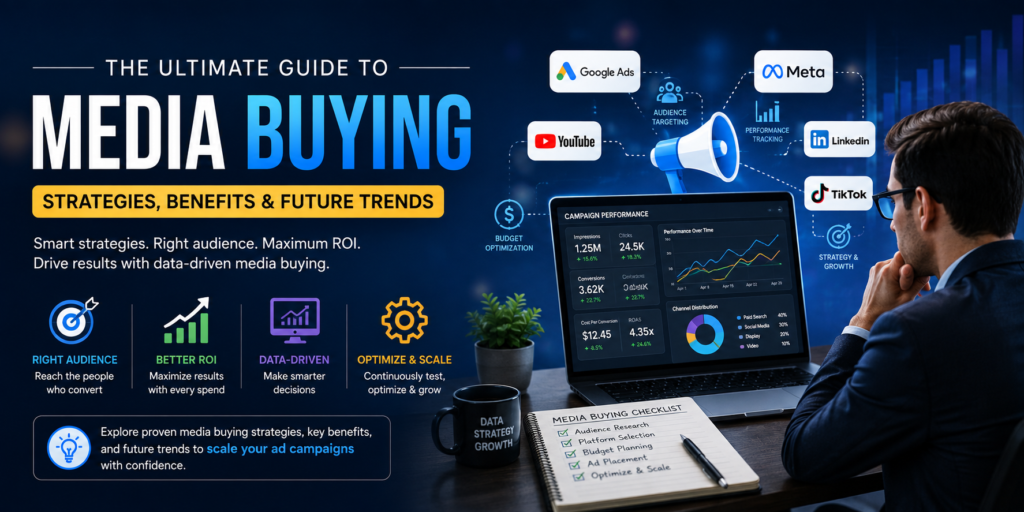
The Ultimate Guide to Media Buying: Strategies, Benefits & Future Trends
In today’s hyper-competitive digital marketplace, capturing consumer attention requires much more than simply launching creative advertisements. Brands must place the right message in front of the right person at the exact moment they are most likely to convert. Achieving this delicate balance demands a structured approach to media buying. Whether you operate a fast-growing e-commerce store, a B2B enterprise, or a local service business, media buying forms the core foundation of modern performance marketing. Navigating ad networks, bidding mechanisms, and audience targeting parameters can quickly feel overwhelming without a clear roadmap. Fortunately, partnering with expert digital growth partners like Nucleosys Tech allows businesses to transform paid advertising channels into reliable, predictable lead generation systems. This comprehensive guide breaks down the essential concepts of media buying, outlines high-converting strategies, highlights key business benefits, and examines emerging industry trends shaping the future of digital advertising. What is Media Buying in Digital Marketing? Media buying is the strategic process of purchasing advertising space across various digital platforms, traditional media channels, web publications, social networks, search engines, and streaming services. The primary objective is to secure premium, high-performing ad placements at the lowest possible cost while maximizing reach, user engagement, and measurable conversions. Historically, media buying involved manual offline negotiations between advertising agencies and publishers like television networks, print newspapers, and radio channels. Today, however, digital media buying relies heavily on automated real-time bidding (RTB), advanced machine learning, and granular data-driven audience segments. The media buying lifecycle generally operates across three continuous phases: Planning and Research: Defining target buyer personas, evaluating channel demographics, analyzing competitor positioning, and allocating initial campaign budgets. Negotiation and Execution: Selecting optimal ad networks, setting up bidding strategies, securing ad inventory, and configuring conversion tracking parameters. Optimization and Scaling: Conducting multivariate A/B testing, reallocating budget toward high-performing segments, and scaling active campaigns to maximize total return on investment. Media Planning vs. Media Buying: Understanding the Difference Many business leaders frequently confuse media planning with media buying. Although these two marketing functions work hand in hand, they address distinct phases of the campaign lifecycle. Aspect Media Planning Media Buying Primary Focus Strategic vision, consumer research, channel selection, and budget allocation. Practical execution, platform bidding, creative setup, and campaign optimization. Core Deliverable Campaign roadmap, target audience personas, and media mix recommendations. Live ad placements, active bidding management, and real-time performance tracking. Key Metrics Estimated audience reach, targeted frequency, and overall campaign timeline. Cost Per Click (CPC), Cost Per Mille (CPM), and Return on Ad Spend (ROAS). Execution Tool Market research data, consumer analytics platforms, and competitive insights. Demand-Side Platforms (DSPs), publisher networks, and direct ad managers. Effective media buying always begins with thorough media planning. When high-level marketing strategy aligns seamlessly with tactical execution, ad campaigns achieve substantially better conversion outcomes. The Core Pillars of Modern Digital Media Buying Executing a profitable media buying strategy requires a thorough understanding of today’s digital channels, automated buying mechanisms, and tracking infrastructure. 1. Programmatic Advertising Programmatic advertising utilizes automated technology and machine learning algorithms to buy and sell ad inventory in real time. Rather than manually negotiating terms with individual web publishers, programmatic platforms allow media buyers to purchase ad impressions across millions of websites within fractions of a second. Programmatic buying relies on three core technological components: Demand-Side Platform (DSP): Software that enables advertisers and media buyers to purchase display, video, mobile, and search ad inventory across multiple ad exchanges through a unified interface. Supply-Side Platform (SSP): Software that enables web publishers and content creators to offer their available ad space to prospective buyers automatically. Ad Exchanges: Digital marketplaces where DSPs and SSPs interact instantaneously to buy and sell ad inventory through automated auctions. According to global advertising industry research, programmatic transactions account for well over 80% of all digital display ad spending worldwide, highlighting its central role in modern campaign execution. 2. Direct Ad Buying Direct ad buying involves purchasing advertising inventory directly from a specific publisher or media owner without relying on middle-tier automated programmatic auctions. This approach is particularly effective for high-impact brand awareness campaigns, exclusive website sponsorships, and custom content integrations. While direct buying typically requires higher minimum spend commitments, it offers guaranteed placement and strict brand safety controls. 3. Real-Time Bidding (RTB) Real-Time Bidding is a dynamic form of programmatic buying where individual ad impressions are bought and sold through instantaneous auctions. As a user opens a web page, an automated auction occurs in the background during the milliseconds it takes for the page to load. The advertiser submitting the winning bid earns the right to present their ad to that specific user immediately. Key Benefits of Media Buying Strategies for Businesses Investing in structured media buying strategies offers immediate and scalable advantages over relying exclusively on organic marketing channels. While organic search engine optimization and organic content creation are crucial for long-term growth, media buying delivers instant visibility, precise control, and measurable customer acquisition. 1. Targeted Audience Acquisition One of the most significant advantages of modern media buying is targeted audience acquisition. Advanced digital advertising platforms allow media buyers to filter prospective buyers based on deep, granular criteria, including: Demographics: Age groups, gender identity, household income brackets, education levels, and family status. Geographics: Specific countries, zip codes, physical store radiuses, or climate zones. Psychographics and Interests: Personal hobbies, professional affiliations, media consumption habits, and lifestyle preferences. Custom Search Intent: Keywords actively searched on search engines, competitor website visits, and relevant app usage behavior. This level of targeting precision ensures that your marketing budget concentrates on users who are actively demonstrating interest or commercial intent. 2. Scalable Return on Ad Spend (ROAS) When campaigns are properly structured and tracked, media buying transforms into a predictable, scalable revenue driver. By systematically tracking performance indicators and refining audience segments, media buyers can achieve a higher Return on Ad Spend (ROAS). A strong ROAS means that every dollar allocated to advertising returns a measurable profit, granting businesses the confidence to scale budgets safely. 3. Comprehensive Digital Ad Spend Optimization Unmanaged ad
Media Planning: The Strategic Backbone of Successful Marketing Campaigns

In today’s highly fragmented digital landscape, capturing consumer attention is harder than ever. Brands launch dozens of ad campaigns every day across social platforms, search engines, streaming networks, and traditional channels. However, throwing money at ads without a deliberate blueprint leads to wasted budgets and missed revenue targets. Understanding why Media Planning: The Strategic Backbone of Successful Marketing Campaigns is essential for any brand that wants to maximize impact and turn ad spend into predictable growth. Media planning serves as the compass for your marketing efforts. It determines where, when, and how often your brand messaging appears before your target audience. By grounding creative ideas in rigorous market research, consumer behavior analysis, and performance data, a well-structured plan ensures every ad dollar works as hard as possible. In this comprehensive guide, we will break down the essential components of modern media planning, explore how it aligns with media buying, and outline a step-by-step strategy to elevate your marketing campaigns and drive scalable return on ad spend. What Is Media Planning and Why Does It Matter? Media planning is the process of evaluating, selecting, and scheduling media channels to deliver a brand’s message to the right audience at the right time. It bridges the gap between creative storytelling and real-world business outcomes. Without a structured digital media strategy, even the most compelling creative assets can fail. Broadcasting a high-end video ad to an uninterested demographic or placing a enterprise B2B ad on a consumer-focused entertainment app wastes valuable resources. Effective planning solves this challenge by analyzing audience media habits, defining clear campaign goals, and allocating capital where it delivers the highest return. Media Planning vs. Media Buying: Understanding the Operational Distinction Marketing teams frequently mix up media planning and media buying, but they represent two distinct phases of a campaign lifecycle: While media buying vs media planning are closely connected, planning always comes first. The planner establishes the roadmap, target metrics, and media mix. Once the strategic blueprint is approved, the buyer executes negotiations, sets up programmatic bids, and secures ad placements. Core Pillars of an Effective Strategic Media Plan Developing a successful campaign requires balancing audience data, budget constraints, and creative capabilities. A modern media plan relies on four core pillars: 1. In-Depth Target Audience Segmentation Mass marketing is largely a thing of the past. Modern campaigns succeed through granular target audience segmentation. Planners evaluate demographic data, psychographic traits, geographic locations, and digital behavior patterns to build precise buyer personas. Knowing whether your ideal buyer frequents LinkedIn, consumes industry podcasts, or searches Google for immediate solutions ensures your messaging lands in the right context. 2. Strategic Campaign Budget Allocation Determining campaign budget allocation across multiple platforms requires a clear understanding of your customer acquisition funnel. Upper-funnel brand awareness initiatives on display or video networks usually require broader reach at a lower Cost Per Mille (CPM). Conversely, lower-funnel conversion campaigns on search engines demand higher Cost Per Click (CPC) investments to capture high-intent prospects. 3. Balanced Integrated Marketing Channels Relying on a single ad channel leaves your brand vulnerable to rising ad costs and platform updates. High-performing planners build a mix of integrated marketing channels—combining paid search, social media ads, programmatic display, email workflows, and out-of-home (OOH) placements to surround the consumer at key touchpoints throughout their buying journey. 4. Continuous Optimization for Maximum Return on Ad Spend (ROAS) Media planning does not end once an ad campaign goes live. Modern marketers continually track performance indicators, evaluate channel efficiency, and shift ad spend toward top-performing placements to improve overall return on ad spend (ROAS). To dive deeper into digital ad standards, privacy guidelines, and performance frameworks, consult official resources like the Interactive Advertising Bureau (IAB) Standards. Step-by-Step Blueprint for Building a Data-Driven Media Plan Creating a comprehensive media strategy requires a systematic process. Here is the six-step framework leading marketing agencies follow: Step 1: Establish Clear Campaign Objectives and Business KPIs Every successful plan begins with defined goals. Are you launching a new product, generating B2B leads, or driving e-commerce sales? Map your goals directly to measurable Key Performance Indicators (KPIs), such as Cost Per Lead (CPL), Customer Acquisition Cost (CAC), or Conversion Rate (CR). Step 2: Conduct Thorough Market and Competitor Research Analyze competitor ad strategies, industry benchmarks, and seasonal buying trends. Tools like Google Keyword Planner and platform ad libraries help reveal where competitors spend their budgets and which messaging angles resonate in your market. For independent industry data on global ad spending and media consumption trends, review the latest market reports from eMarketer Advertising Insights. Step 3: Select the Optimal Media Mix Match your buyer personas with the platforms they use daily. A modern B2B campaign might pair LinkedIn Sponsored Content with Google Search Ads and programmatic retargeting. An e-commerce brand, on the other hand, might focus on Instagram Reels, TikTok video ads, and Google Shopping feeds. Step 4: Determine Media Scheduling Strategies Choosing the right timing for your ad delivery is critical for controlling costs and preventing audience fatigue. Planners choose from three primary media scheduling strategies: Continuity: Running ads at a constant rate over the campaign duration. Ideal for essential products with steady demand. Flighting: Alternate periods of active advertising with complete breaks. Useful for seasonal products or tight budgets. Pulsing: Maintaining a low-level baseline of continuous ads, punctuated by heavy promotional pushes during peak sales periods. Step 5: Implement Programmatic Media Distribution and Ad Tracking Modern digital media plans rely heavily on programmatic media distribution to automate ad purchases using real-time bidding algorithms. Before launching, verify that conversion tracking pixels, custom event parameters, and Google Analytics goal flows are configured correctly across all landing pages. Step 6: Measure, Refine, and Scale Analyze impression delivery, click-through rates (CTR), and conversion volume daily. Reallocate capital away from underperforming ad groups and expand budgets on high-converting channels to scale campaign performance smoothly. Common Media Planning Challenges and How to Overcome Them Even well-crafted plans can run into hurdles. Here are the most common challenges media planners face